Accelerating Materials Discovery with Data-Driven Tools#
Harness the power of data science to explore, analyze, and visualize materials properties like never before.
Using cutting-edge tools like pymatgen, ASE, and matminer, this tutorial series will guide you step by step through the process of querying, visualizing, and analyzing materials data from world-class databases.
Modern materials science is undergoing a data revolution. Thanks to advances in high-throughput density functional theory (DFT), thousands of materials are simulated and characterized daily, resulting in massive datasets that hold the key to discovering new functional compounds.
However, extracting insights from these datasets is not trivial. That is where tools like:
Materials Project → a comprehensive database with millions of computed materials properties
pymatgen → a Python library for analyzing structures and properties
ASE → for interactive 3D visualization of atomic structures
matminer → for feature extraction, dataset access, and materials data mining
help researchers, engineers, and students accelerate materials discovery for technologies like semiconductors, photovoltaics, energy storage, catalysis, clean fuels, and batteries.
What You will Learn#
By following this tutorial series, you will learn how to:
✅ Access and query materials properties using the Materials Project API.
✅ Visualize atomic structures in 3D using pymatgen and ASE.
✅ Analyze and compare materials based on structural, electronic, and thermodynamic properties.
✅ Mine data from curated datasets using matminer.
✅ Gain practical, hands-on experience with data-driven materials science.
Each tutorial is designed to be beginner-friendly yet practically useful, combining clear explanations with real-world examples.
Tutorial Roadmap#
Tutorial |
Description |
Tools Covered |
|---|---|---|
1. Accessing Materials Data |
Learn to query the Materials Project database and retrieve materials properties for analysis. |
|
2. Visualizing Atomic Structures |
Explore and visualize 3D structures interactively using ASE and pymatgen. |
|
3. Querying and Comparing Materials |
Perform filtered searches and compare candidate materials based on their properties. |
|
4. Data Mining with Matminer |
Work with curated datasets, perform filtering, feature extraction, and statistical analysis. |
|
Each tutorial builds on the previous one, so we recommend working through them in order.
Who Is This For?#
This tutorial series is designed for:
Students in materials science, chemistry, and physics.
Researchers exploring new compounds and their properties.
Engineers seeking to integrate data-driven workflows into Research and Development.
Developers curious about materials informatics.
Prerequisites#
Curiosity and enthusiasm for materials science.
No prior experience with DFT, databases, or visualization tools required — we will guide you through it!
Running the tutorial in Google Colab#
You do not need to install anything locally to follow this tutorial. All notebooks can be opened and executed directly in Google Colab.
1. Open the Notebook in Colab#
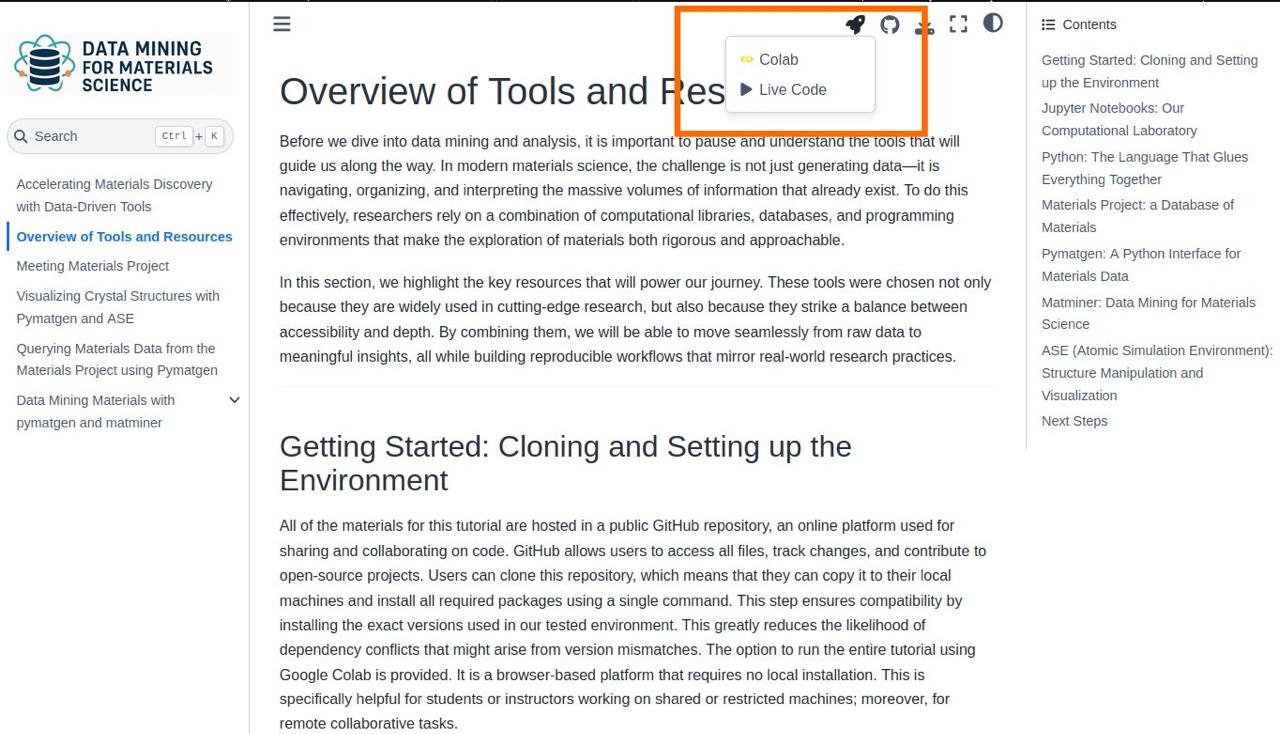
Navigate the tutorial website.
At the top of each section, click the rocket icon and then launch in colab, as shown in the picture:
2. Install Required Packages#
Each notebook specifies the packages it needs. Usually, you can run the first cell to install them. For example:
!pip install pymatgen matminer seaborn
3. Run the Notebook Cells#
Press Shift+enter (or click the ▶ button) to execute a cell.
Run the cells in orer, top to bottom.
If something fails (e.g., missing package), check the installation cell again.
4. Saving Your Progress#
To save a copy of the notebook with your edits: File → Save a copy in Drive
To download locally: File → Download → .ipynb Or you can download it directly from this page by clicking the download icon at the top right.